Analytics on any
ServiceNow table,
instantly.

No Platform Analytics setup required
Open any list view, type /viz, and your dashboard appears in seconds.
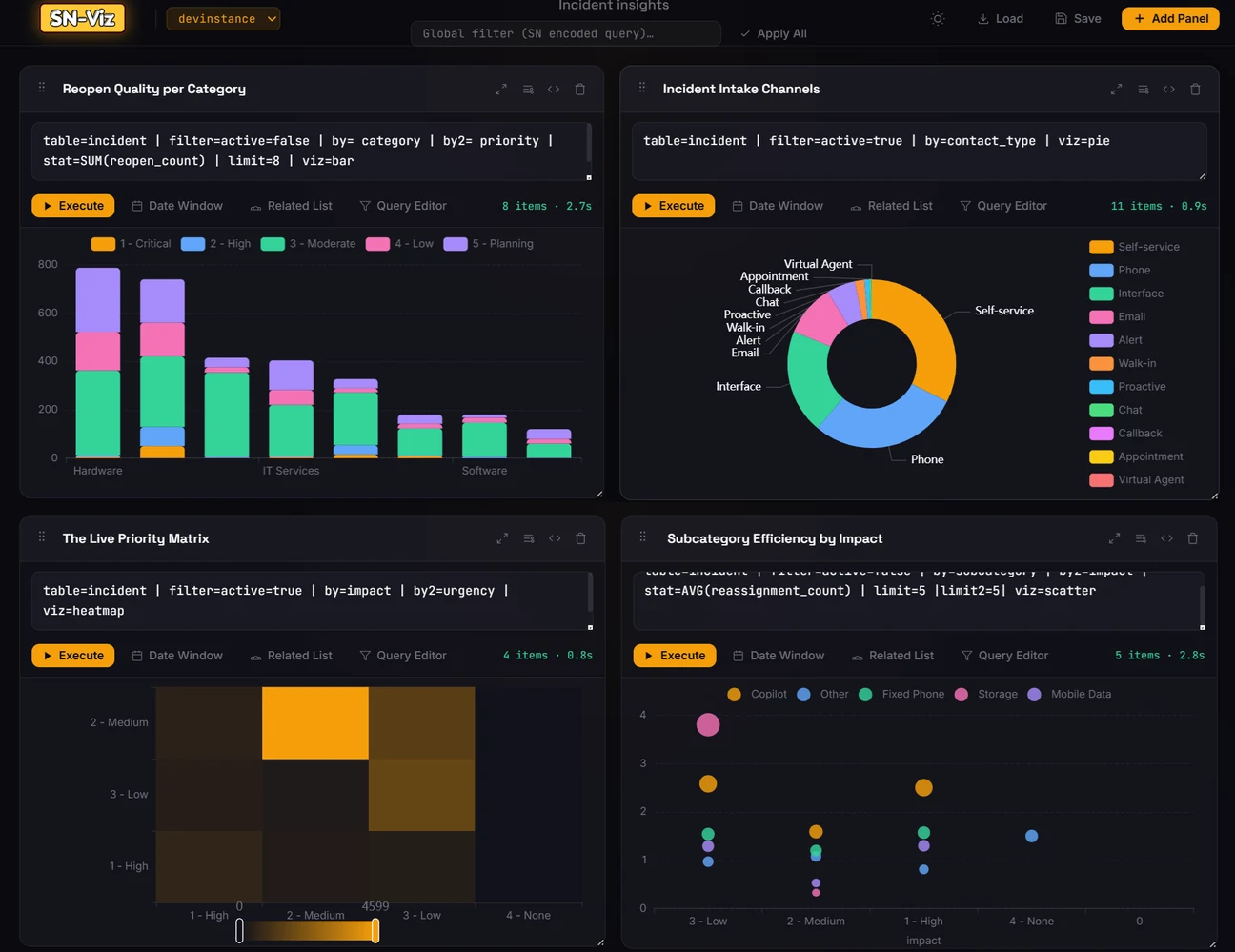
Visualize Now
SN-Viz Dashboard
SN-Viz 4-panel analytics dashboard
Features

Essential features only.
Built for a fast start.

1 Launch

Three ways to open,
zero configuration.

Open SN-Viz directly from the extension popup, or invoke it right from any ServiceNow list view using slash commands.

/viz → opens SN-Viz scoped to current list
/viz generate → auto-generates visuals from current list context
/viz typed in SN-Utils integrated view
⤢ Expand
/viz — SN-Utils integrated
/viz typed in native ServiceNow list
⤢ Expand
/viz — native SN list
2 Query & Visual Editor

A simple DSL,also configurable
with simple UI dropdowns.

Write queries in a clean pipe-delimited DSL. Start by typing inside query editor or use the visual editor for dropdowns,both having autocomplete support.

table=incident | filter=active=true | stat=COUNT | by=category | limit=8 | viz=bar
View complete DSL reference →
Panel showing DSL query and resulting chart
⤢ Expand
Manual DSL + chart result
Visual editor panel open with dropdowns
⤢ Expand
Visual Editor
3 RLC & Drilldown

Related list conditions
and drilldown support.

Use RLC to filter parent records based on data in their child records. Click on any segment in visual to drilldown to the filtered list opening it in ServiceNow list view.

RLC Visual Editor showing related list context filter
⤢ Expand
RLC Visual Editor
Chart with hover tooltip showing drilldown
⤢ Expand
Hover & drilldown
4 Autocomplete

Dot-walking &
autocomplete everywhere.

Dot walking support for all fields in DSL and autocomplete support everywhere (for both field names and values).

Dot-walk autocomplete in manual DSL query editor
⤢ Expand
Dot-walk in DSL editor
Dot-walk autocomplete in visual editor
⤢ Expand
Dot-walk in Visual Editor
5 Dashboards

Custom dashboards,
saved and shareable.

Build multi-panel dashboards mixing any chart types. Resize panels with drag handles. Reorder by dragging. Save to browser storage or export as JSON to share with your team.

Custom 4-panel SN-Viz dashboard
⤢ Expand
4-panel custom dashboard
Save dashboard modal with JSON export option
⤢ Expand
Save & Export JSON